















How to Receive and Send USDC on Stellar: Step-by-Step Guide in HOT Wallet
In this article, we’ll show you how to conveniently receive and send USDC, XLM, EURC, and other tokens on the Stellar blockchain using HOT Wallet. We’ll break down every step in the simplest way possible so even a complete beginner can quickly get it. Special attention will be given to the advantages of HOT Wallet: free asset activation, protection against fund loss, full support for claimable balances, built-in swaps, staking, and much more - that’s why HOT Wallet remains the best choice for working with Stellar.

What is Stellar and how is it related to USDC?
Stellar is a decentralized blockchain platform built specifically for fast, cheap, and reliable cross-border payments. It enables near-instant transfers of fiat currencies, stablecoins, and other assets with minimal fees - often less than a cent. Stellar is perfect for everyday transfers, remittances, and integration with traditional finance.
USDC (USD Coin) is one of the most popular stablecoins, issued by Circle. On Stellar, USDC is a native asset issued directly by the issuer, ensuring maximum speed and low costs. Recently, Circle also launched the euro stablecoin EURC on Stellar - it’s currently one of the fastest-growing assets in the network.
How to Receive USDC in HOT Wallet
Receiving USDC (or any other token on Stellar - XLM, EURC, etc.) in HOT Wallet is very easy and takes just a few seconds. HOT Wallet is available in three formats: mobile app (Android/iOS), browser extension (Chrome and others), and Telegram Mini App. Currently the main focus is on the mobile app and browser extension - they provide maximum speed, convenience, and full functionality. Telegram Mini App remains a handy option for quick access without installation.
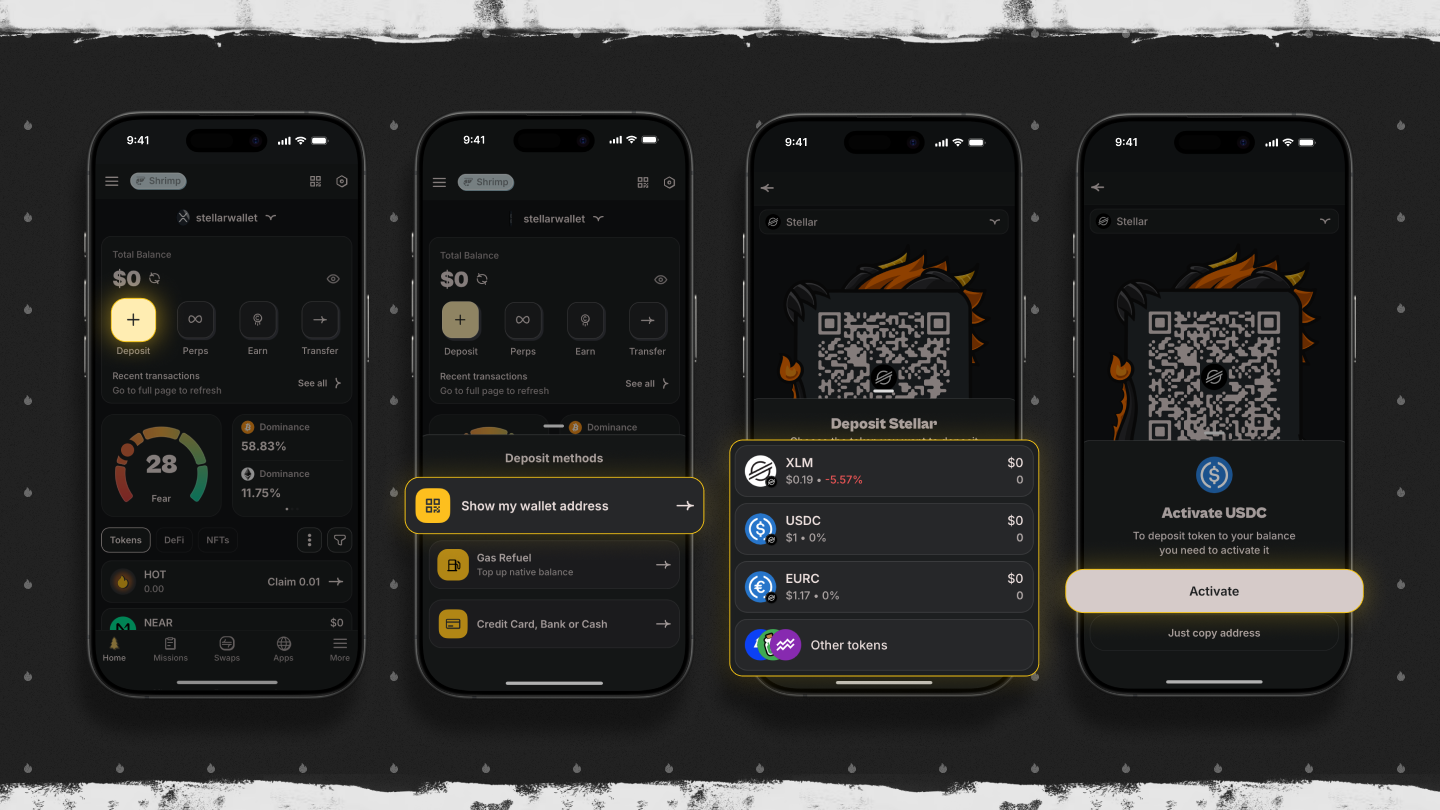
On the main page, tap the “Deposit” button, then “Show My Wallet Addresses.” In the list of networks, select Stellar. Then find USDC (or EURC, XLM, etc.) in the list of assets. If the asset isn’t in your wallet yet, the system will offer to activate it - in HOT Wallet this is completely free, with no need to hold extra XLM for reserve (unlike most other wallets).
After activation, tap “Copy Address.” You’ll get the public address of your Stellar account. Send USDC to it from any exchange, another wallet, or via bridge. For receiving in HOT Wallet, no memo is required - the system automatically processes incoming transactions without extra fields.
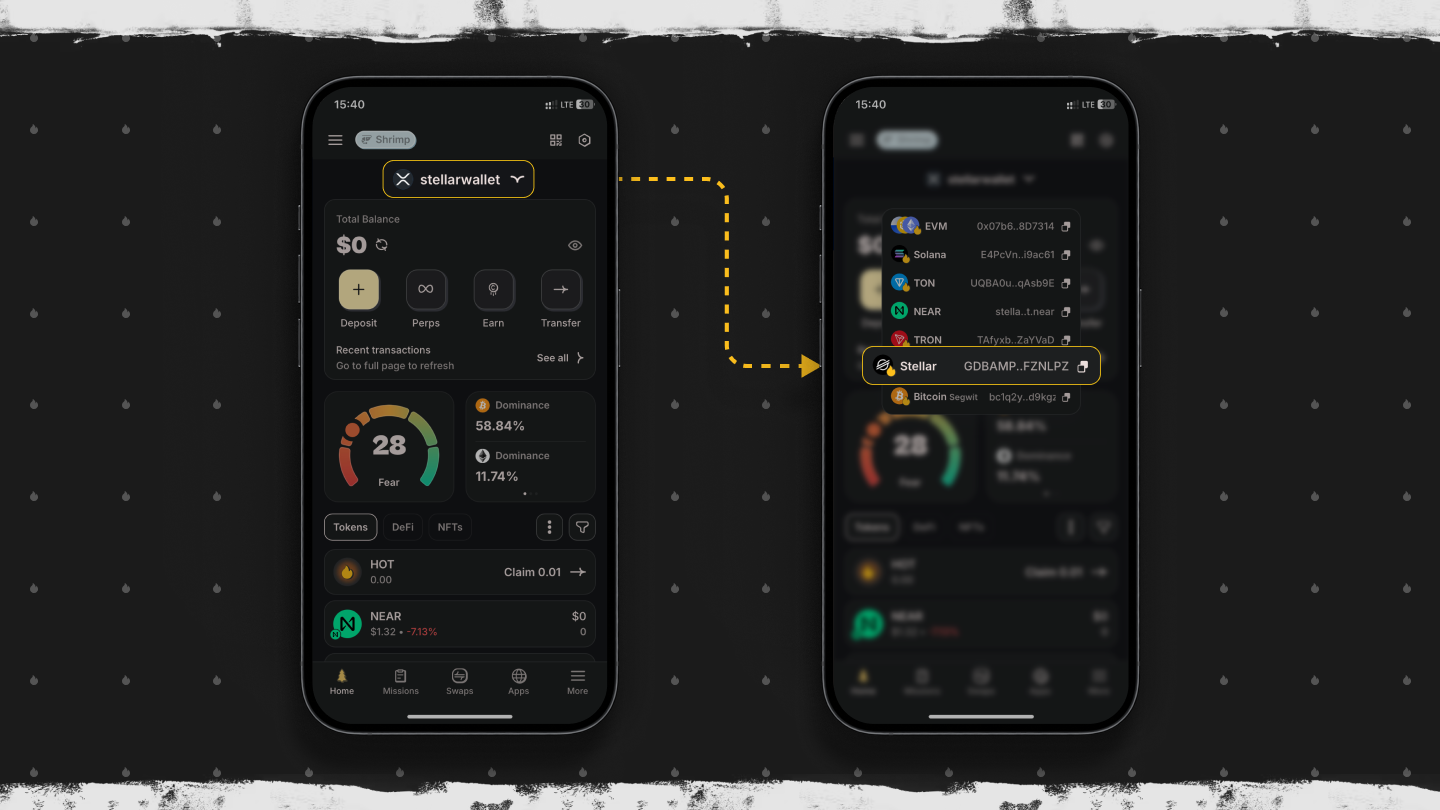
For even faster access - the HOT Wallet main page has quick entry to your Stellar account. Just tap the Stellar balance, select the desired token - the address copies in one click. Everything is intuitive with no extra steps.
Activate USDC for Free in Hot Wallet
On Stellar, storing any asset (except XLM) requires creating a trustline - a special relationship between your account and the token issuer. This is needed so the network knows you trust that issuer and are ready to receive their assets. Each trustline reserves 0.5 XLM (base account reserve - 1 XLM + 0.5 XLM per trustline and other sub-entries). These funds are frozen and not spent, but in regular wallets you have to hold them yourself. Full details on trustlines and reserves in the official Stellar documentation: Manage Trust | Stellar Docs.
HOT Wallet makes activation completely free for the user. The team covers all costs for creating the trustline and reserve - you pay nothing and don’t freeze any extra XLM. This is one of the key advantages of HOT Wallet: in other wallets activating USDC or EURC can cost 1-2 XLM, sometimes more for new accounts. In HOT Wallet you just select the token - and it’s instantly ready to receive.
Another big plus - no memo needed for receiving. Many users lose funds by sending to exchanges without a memo or vice versa. HOT Wallet prevents such mistakes at the interface level.
How to Send Tokens on the Stellar Network
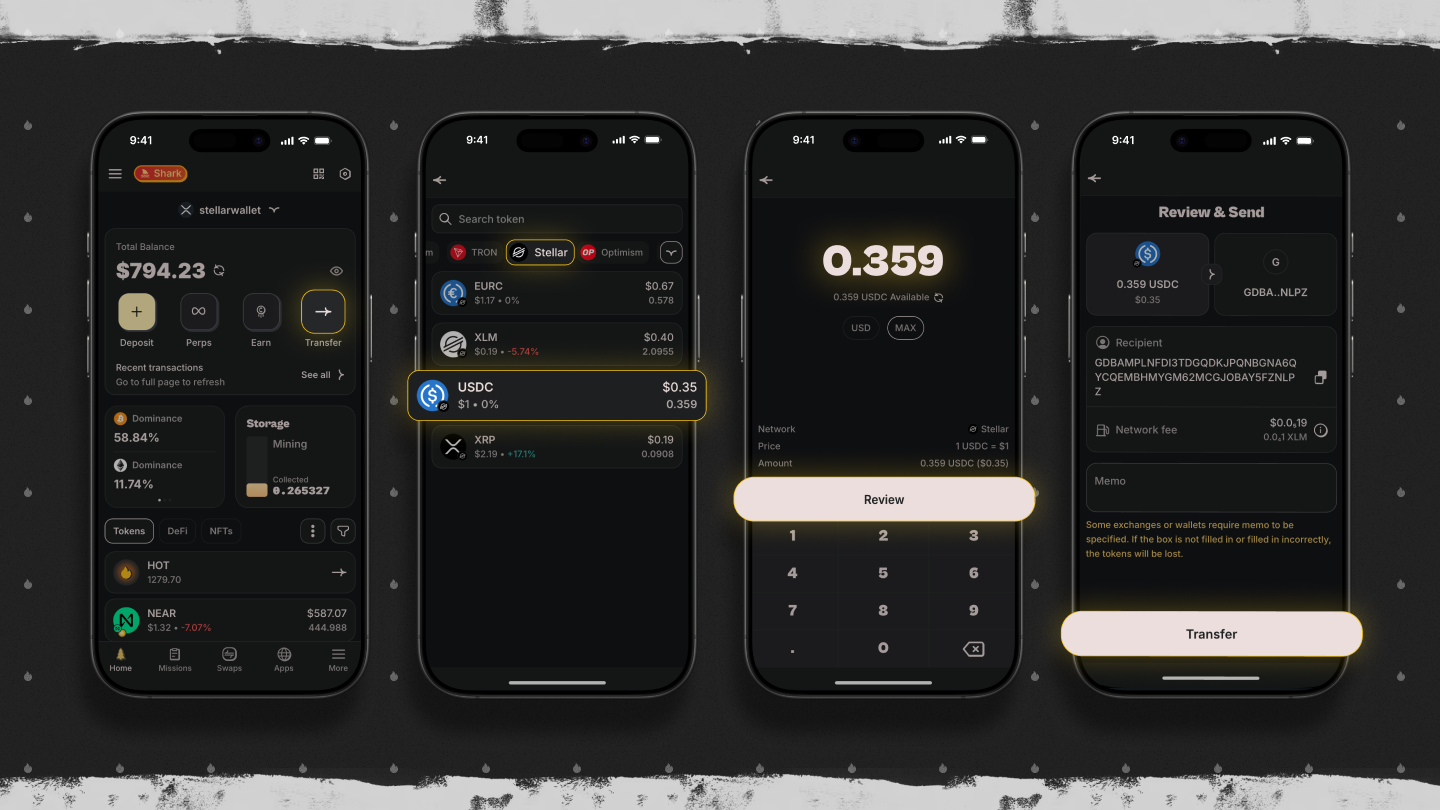
Sending tokens on Stellar through HOT Wallet is fast, secure, and convenient. Open HOT Wallet, tap “Transfer.” Select the Stellar network, then the token - USDC, XLM, EURC, or any other. Enter the recipient’s address (paste from clipboard or scan a QR code). Specify the amount and tap “Review”.
Important note: if you’re sending to an exchange (Binance, Bybit, OKX, etc.), you must include a memo (Memo). Without it, funds can be lost forever - this is one of the most common issues on Stellar. HOT Wallet protects users by blocking the “Transfer” button if the address belongs to an exchange and no memo is entered. The system automatically checks the address type and requires the field to be filled - a unique protection not found in most wallets.
Fees are minimal - usually 0.00001 XLM per transaction.
Claimable Balances on Stellar
One of the most useful features of Stellar is the claimable balances mechanism. If someone sends you tokens (e.g. USDC) to an unactivated account or an address without a trustline, the network doesn’t reject the transaction - it creates a claimable balance. These funds stay “frozen” until the recipient creates and activates the account and sets up the trustline. Detailed explanation in the official Stellar documentation: Claimable balances | Stellar Docs.
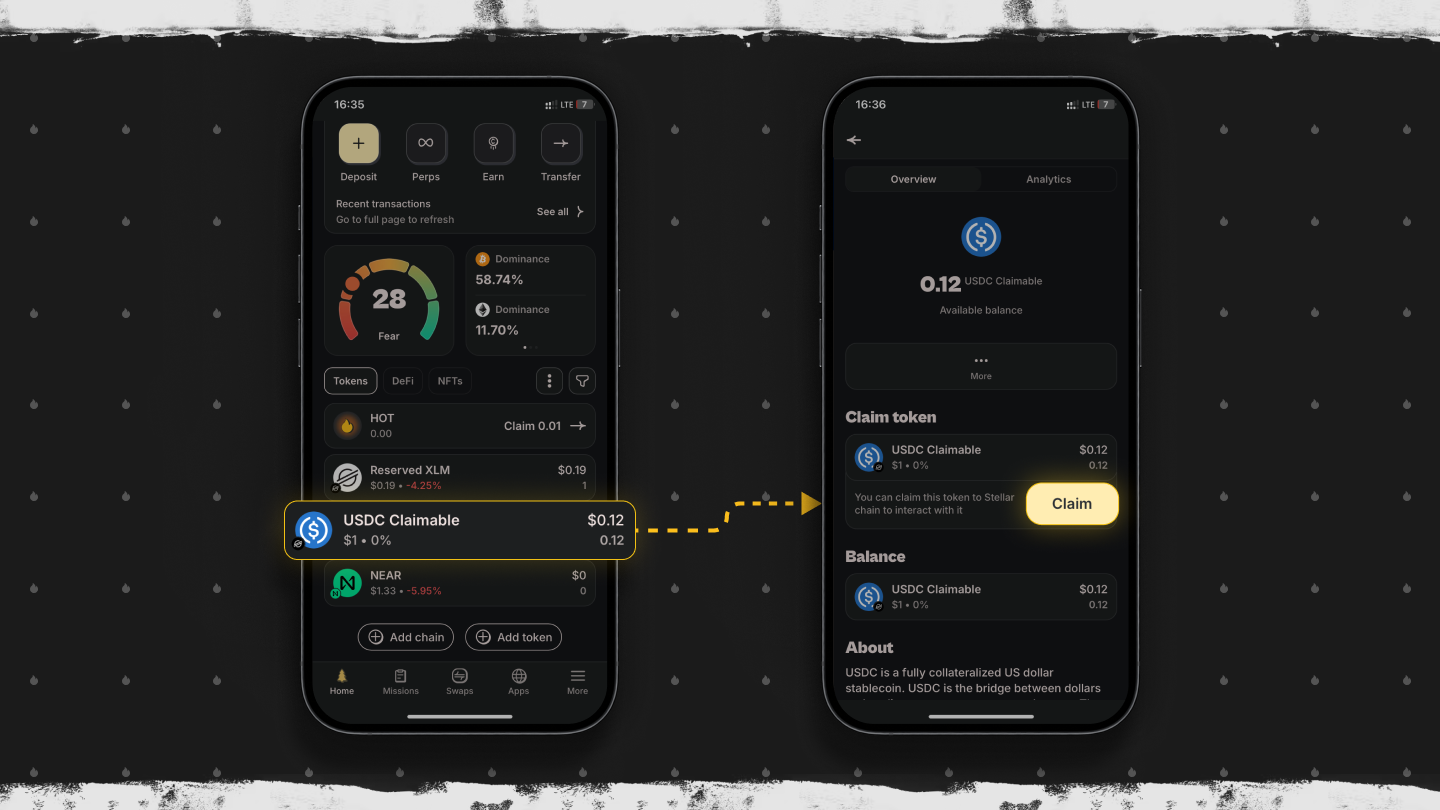
HOT Wallet is the only wallet that fully supports claimable balances. If tokens were sent to an empty address, they’ll appear in the section labeled “Claimable.” You can claim them for free with one click - HOT Wallet automatically creates the required trustlines and handles the reserve with no extra cost to you.
If you sent tokens to another Stellar wallet and the recipient can’t see them (account empty or no trustline), advise them to import the seed phrase or private key into HOT Wallet. After import, claimable balances will appear immediately and can be claimed for free. This saves thousands of dollars that would otherwise remain “stuck” forever.
Conclusion
HOT Wallet is the most functional and secure wallet for Stellar. Thanks to free asset activation, built-in protection against loss without memo, full claimable balances support, instant swaps, XLM/USDC/EURC staking, cross-chain bridges, and Telegram integration, it outperforms all alternatives. The MPC architecture provides decentralized security with no single point of failure, and the partnership with the Stellar Foundation ensures reliability and up-to-date features.
HOT Wallet is perfect for both beginners and experienced users: simple interface, zero hidden fees on Stellar, high privacy, and support for over 100 chains. If you work with Stellar - this is your best choice.
- We also recommend reading the article “HOT Wallet - Best Stellar XLM Wallet”, which covers all additional features in detail.
Join the HOT Wallet community! Discuss, share your experience, and get fast answers:
- Discuss on Reddit →
- Watch video guides on YouTube → https://www.youtube.com/@hot-labs
- Follow news on X → https://x.com/hotdao
- Reels and quick tips on Instagram → https://www.instagram.com/hot_labs
- Get updates on Telegram → https://t.me/hot_wallet
- Read full articles on Medium → https://hot-labs.medium.com/
We look forward to your comments and questions! 🔥


