















How to Use Polymarket in 2026: The Complete Guide with HOT Wallet
It’s 2026. Midterm elections in the US are heating up, Bitcoin is blasting past new highs again, and the Champions League knockout stages are promising absolute chaos. Where can you outsmart the crowd and actually profit from your predictions? On Polymarket - the decentralized prediction market that took the crypto world by storm in 2026.

What is Polymarket?
Polymarket is a decentralized prediction market built on the Polygon network. In 2026, it’s become a massive hit: billions of dollars in bets (with the entire prediction market sector already surpassing $44 billion, according to Forbes), fully transparent markets, and zero middlemen like traditional bookmakers. You can bet on politics, sports, crypto prices, pop culture - everything - using USDC on Polygon with tiny fees. This isn’t just gambling; it’s a way to monetize your knowledge of the world.
Why HOT Wallet is the Best Choice for Polymarket
HOT Wallet is perfect for Polymarket because it’s non-custodial, highly secure, and supports every major chain.
Key advantages of HOT Wallet for Polymarket users:
- Top-tier security with MPC technology: Your keys are distributed across multiple parties, so even if your device gets compromised, your funds stay safe.
- 2FA protection and easy recovery without risking your seed phrase (soon you’ll be able to change your seed without restarting the wallet).
- Full multichain support - trade on Polymarket using Polygon without switching wallets: your assets from Ethereum, Solana, BNB Chain, and more are all accessible in one place.
- Built-in bridge + Gas Refuel - move USDC from any chain to Polygon in seconds and pay gas fees with whatever token you already hold (no need to buy POL separately).
- Lightning-fast, low-cost transactions - confirmations in seconds, even during peak hype.
How to Connect HOT Wallet to Polymarket (Takes 1 Minute)
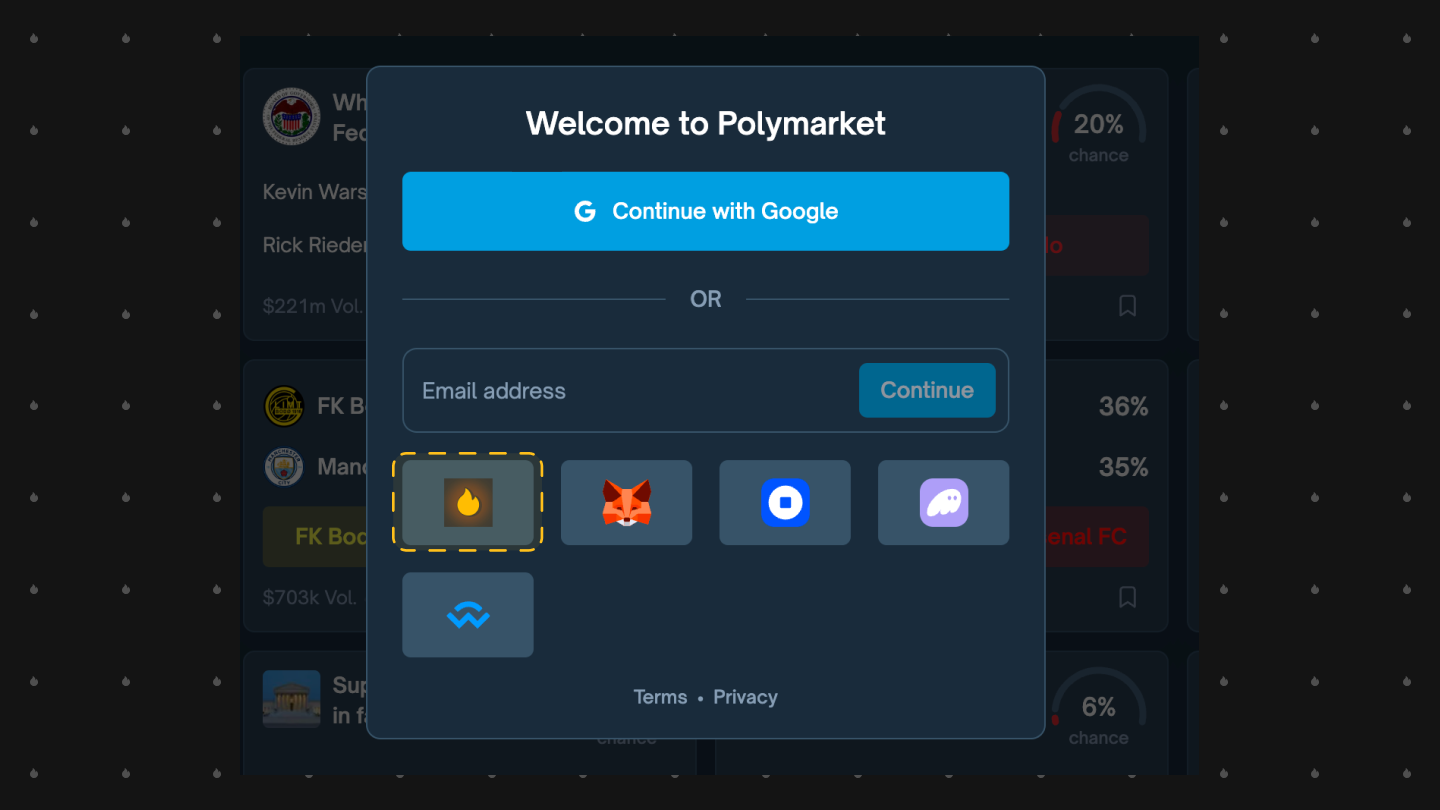
- Download HOT Wallet (mobile app, browser extension, or Telegram Mini App).
- Go to polymarket.com.
- Click Connect Wallet.
- Choose WalletConnect (or direct connection as on the screenshot).
- Scan the QR code or confirm in your wallet.
- Fund your wallet with USDC on Polygon (if your funds are on another chain, use the built-in bridge).
Done! You’re now ready to bet on Polymarket - fast, secure, and with minimal fees.
How to Get USDC on Polygon Using the Built-in Bridge
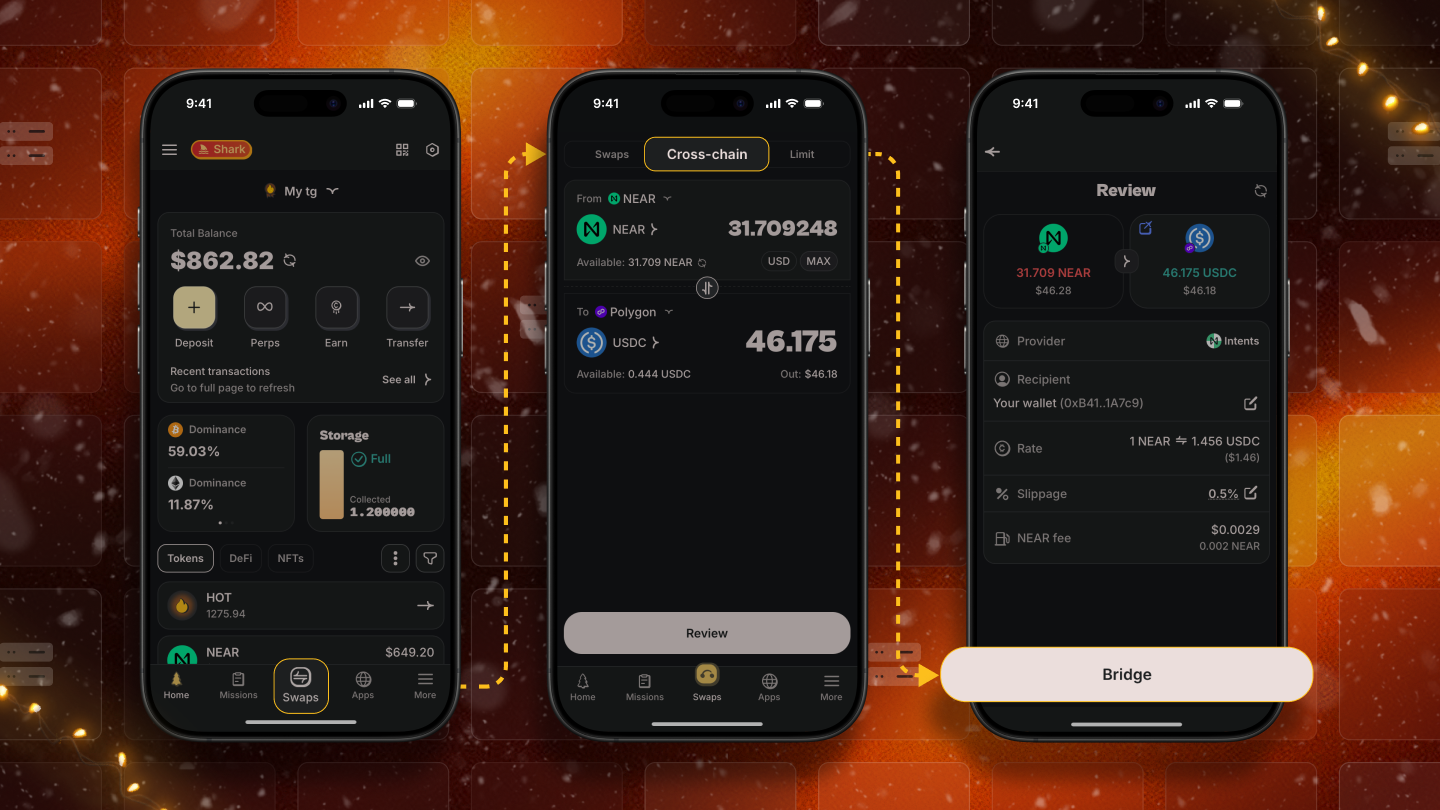
- The built-in bridge lets you transfer assets from Ethereum, Solana, BNB Chain, and more directly to Polygon in seconds. Running low on POL for gas?
- Use Gas Refuel to pay fees with any token you already have - no extra steps or purchases needed.
This means you can interact with Polymarket even if your funds are scattered across chains - everything happens inside one wallet, no extra apps or risks.
How to Place Bets on Polymarket
Once connected, it’s incredibly simple:
- Browse available markets - politics, sports, crypto, even meme events.
- Pick a market and click Yes or No on the outcome.
- Enter the amount of USDC you want to bet.
- Confirm the transaction in HOT Wallet.
Final Thoughts
In 2026, Polymarket isn’t just a betting platform - it’s a real way to earn money from what you know about the world. And HOT Wallet makes the entire experience secure, fast, and effortless - from connecting to cashing out your winnings. Don’t waste time with less reliable wallets. Do it right with HOT Wallet. Download HOT Wallet right now and start turning your knowledge into profits!


