















Ledger + HOT Wallet: The Complete Guide to Connecting Your Hardware Wallet
In this article, we will take a detailed look at how to connect a Ledger hardware wallet to HOT Wallet, set it up for NEAR, Solana, TON, Ethereum, BNB, TRON, Bitcoin and Stellar networks, explain how transaction signing works, why Blind Signing is necessary, and what to watch out for when using Ledger. This material is suitable for both beginners and experienced users.

What is Ledger and Why It’s Called a Cold (Hardware) Wallet
Ledger is a physical hardware device for storing private keys. Unlike software wallets, where keys are stored on a computer or smartphone, in hardware wallets the private keys never leave the device.
Important to know:
Ledger does not store cryptocurrency. Crypto assets always remain on the blockchain, while Ledger securely stores your private keys, which you use to authorize transactions.
We strongly recommend:
- Writing your seed phrase only on a physical medium (paper, metal plate)
- Never storing the seed phrase on a computer, in notes, in the cloud, or on any device with internet access
Ignoring these rules completely undermines the use of Ledger as a cold wallet.
Step One – Installing Applications
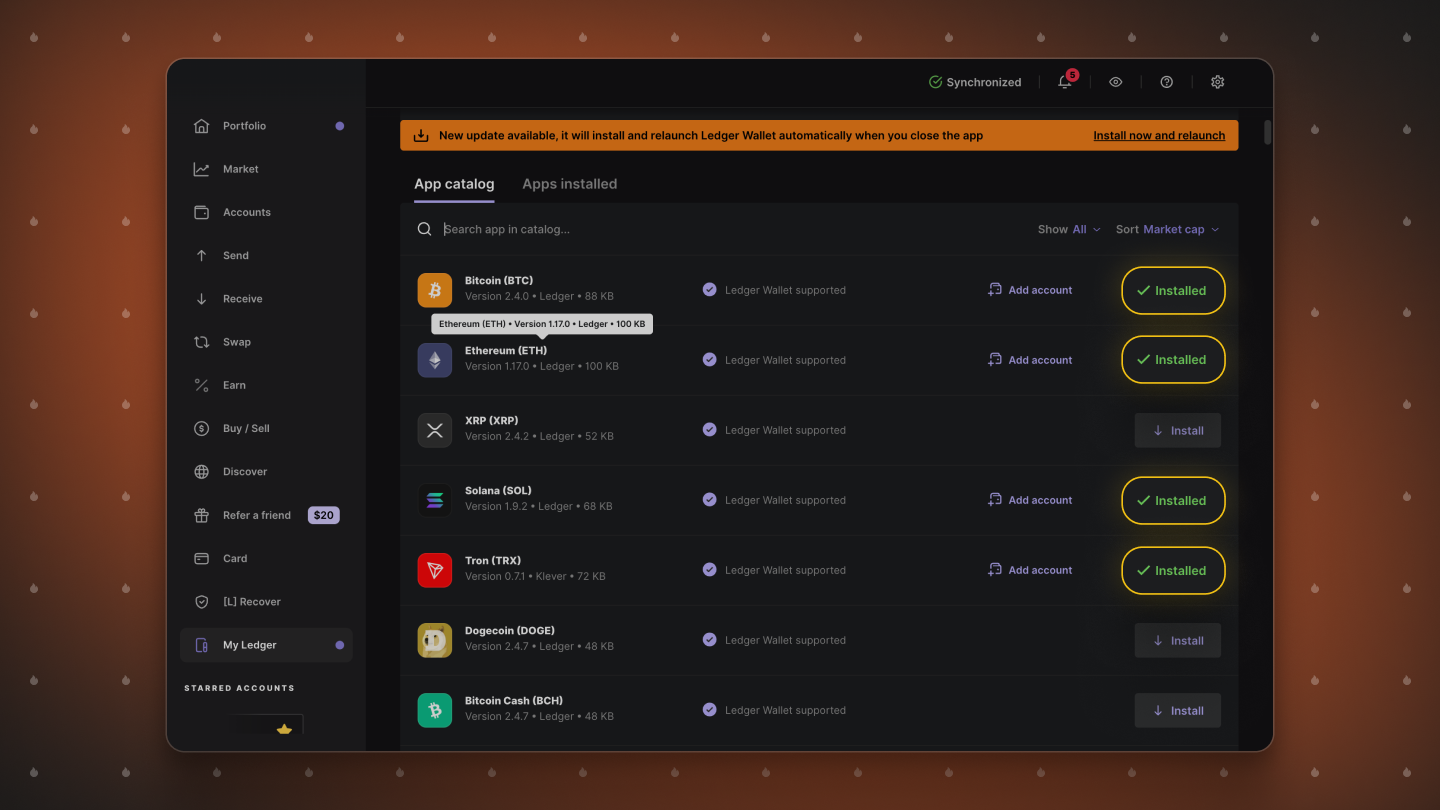
After purchasing your Ledger, completing the initial setup, and saving your seed phrase, your device is ready to use.
First, you need to:
- Download the official Ledger Wallet app (formerly Ledger Live)
- Connect the device to your computer and update the firmware if necessary
- Install the apps for the blockchains you want to use
Each network requires a separate app:
- For all EVM networks (Ethereum, BNB Chain, Base, etc.), the Ethereum app is sufficient
- For Solana – the Solana app
- For Bitcoin – the Bitcoin app, and so on
Technically, you can also use Ledger through Ledger Wallet, but in practice this app is very limited: many tokens are not displayed, and full interaction with apps and DeFi services is not possible.
This is why in the crypto industry it is common to connect Ledger to a more functional wallet, such as HOT Wallet.
Connecting Ledger to HOT Wallet
Once all apps are installed, you are ready to connect your Ledger.
Step-by-step instructions:
- Open HOT Wallet and click Import Account
- Select Hardware Wallet -> Ledger
- Connect your Ledger to the computer via cable or Bluetooth and unlock the device
- HOT Wallet will then prompt you to select available networks. You can connect any of them, and add new networks later directly in the wallet interface if needed
Derivation Paths
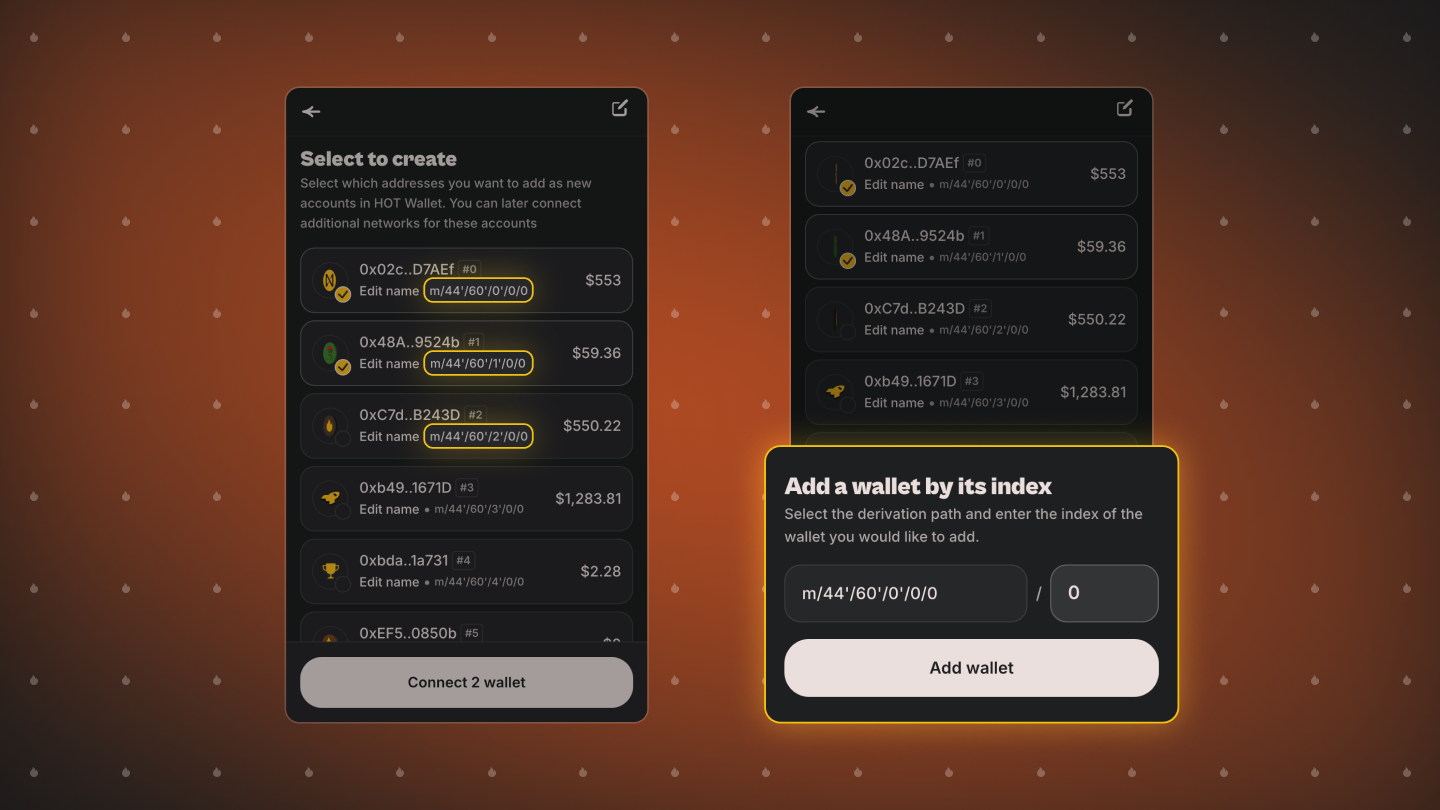
After connecting, you will see a screen with several accounts. You might wonder: how can that be if you only have one Ledger?
In reality, one Ledger can contain multiple accounts within a single network. Each account has its own unique derivation path, usually labeled as #0, #1, #2, and so on.
Advanced users often use multiple accounts on one device for different strategies, portfolios, or risk levels.
For convenience, HOT Wallet:
- Shows balances for each account in advance
- Allows importing one or multiple accounts at once
- Lets you select a specific derivation path
- Lets you rename an account before importing it via the Edit button so it appears with a clear, recognizable name
Connecting Other Networks and Creating a Multichain Portfolio
Most popular wallets, such as MetaMask or Trust Wallet, only allow connecting Ledger within a single network. If you want to manage multiple networks within one account, this can be a problem.
HOT Wallet solves this issue.
It allows combining different blockchains in one account and managing a multichain portfolio from a single interface, as well as performing cross-chain operations. You can add additional networks via the Deposit button, quick access to addresses in the center of the screen, or through Settings -> My Networks.
As a result, you can manage all EVM networks Ethereum, BNB Chain, Base, Stellar, NEAR, TON, Bitcoin, TRON, Solana, and others simultaneously.
Disconnecting Accounts
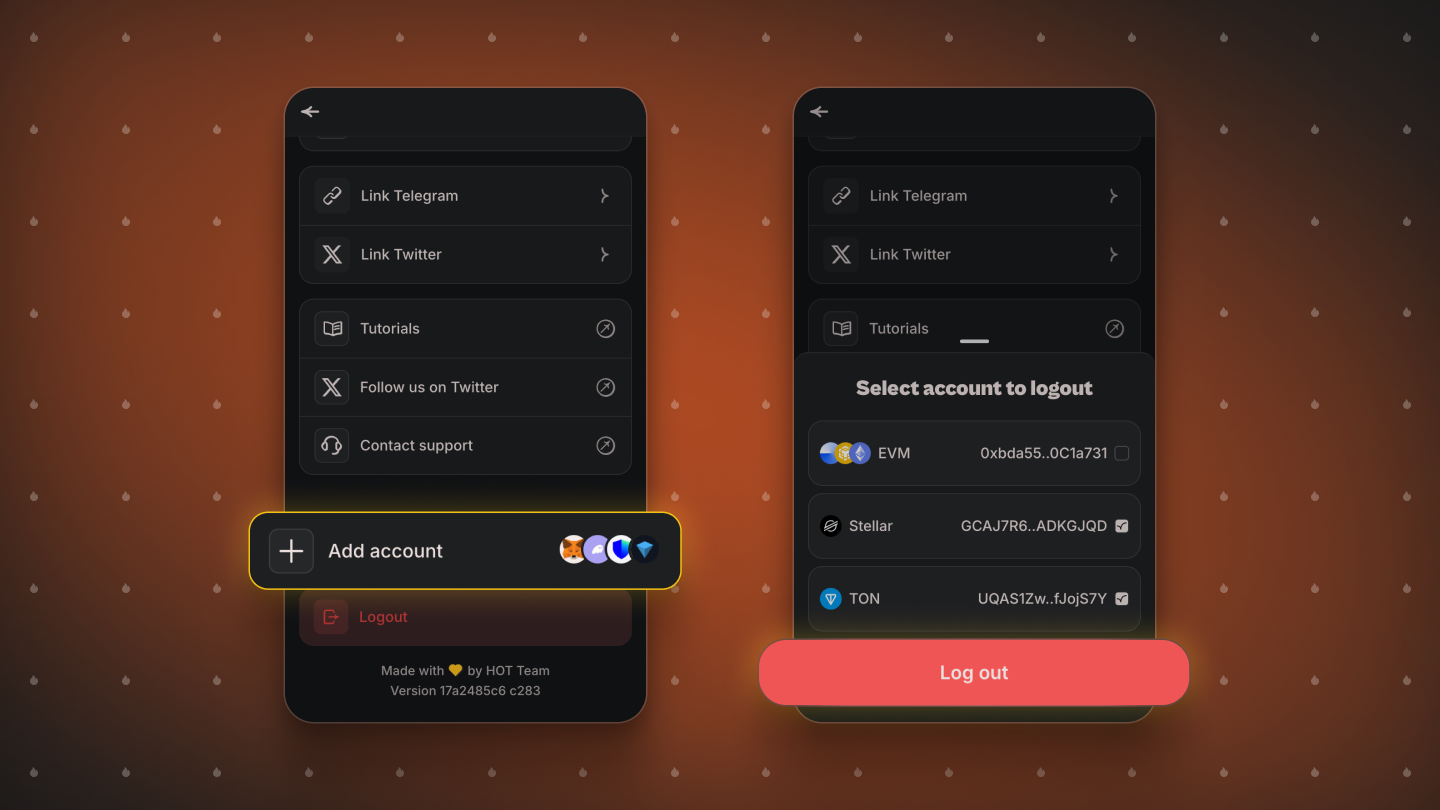
To disconnect a Ledger account from HOT Wallet:
- Go to Settings
- Select Log out
If you have multiple networks connected, you can:
- Disconnect all networks at once
- Or choose specific networks to disconnect
Transaction Signing
Once Ledger accounts are connected, you can fund them and use all HOT Wallet features:
- Transfers
- Swaps
- Connecting to apps
- NFT storage
- Bridges and cross-chain operations
- Staking
The key difference from regular wallets is that every transaction must be confirmed on the Ledger device. This means that without physical access to your device and manual confirmation, the transaction will not be executed, greatly enhancing security.
Blind Signing
Blind Signing is a transaction signing mode in which Ledger approves operations whose data cannot be fully displayed on the device screen.
It is necessary for:
- Interacting with smart contracts
- Working with DeFi protocols
- Using complex apps and cross-chain operations
HOT Wallet always alerts users if an operation requires enabling Blind Signing and guides them to where it can be turned on in Ledger settings. This helps balance convenience and security.
Conclusion
HOT Wallet is one of the most convenient solutions for working with Ledger. It supports a wide range of networks, combines them into a single interface, and allows flexible multichain portfolio management.
With HOT Wallet, you can:
- Work with multiple Ledger accounts at once
- Perform mass account imports
- View balances before connecting
- Manage all assets from a single wallet without compromising security
Join our community:


